This talk is well worth the watch if you want a clear overview of modern .NET configuration practices.
All talk materials are publicly available on GitHub. The slides themselves are written in Markdown.
- Resource: GitHub Repository
- Slides: Slides.md
At NDC Copenhagen, Chris Ayers, a Principal Software Engineer at Microsoft, walked through the architecture of the .NET configuration pipeline. While configuration is often considered a solved problem, misconfigured settings are one of the most common causes of silent runtime failures.
This post serves as a technical deep dive into how .NET reads, binds, validates, and manages configuration in modern distributed architectures.
What Exactly is “Configuration”?
Configuration is not a monolith; rather, it is a collection of distinct operational values divided into three primary categories:
- Settings: Non-sensitive values that govern runtime behavior, such as retry delays, request timeouts, and maximum queue lengths.
- Feature Flags: Dynamic toggles that conditionally activate or deactivate code paths (e.g., rolling out a new portal to 10% of users).
- Secrets: Sensitive data requiring absolute security, such as database connection strings, TLS certificates, and OAuth client credentials.
The Evolution: Compile-Time vs. Run-Time Configuration
A classic anti-pattern in the legacy .NET Framework era was baking configurations at compile-time. Different build configurations (such as Debug, Staging, and Release) compiled distinct binaries using XML transformations (web.config) with tools like SlowCheetah.
Legacy Compile-Time Pattern
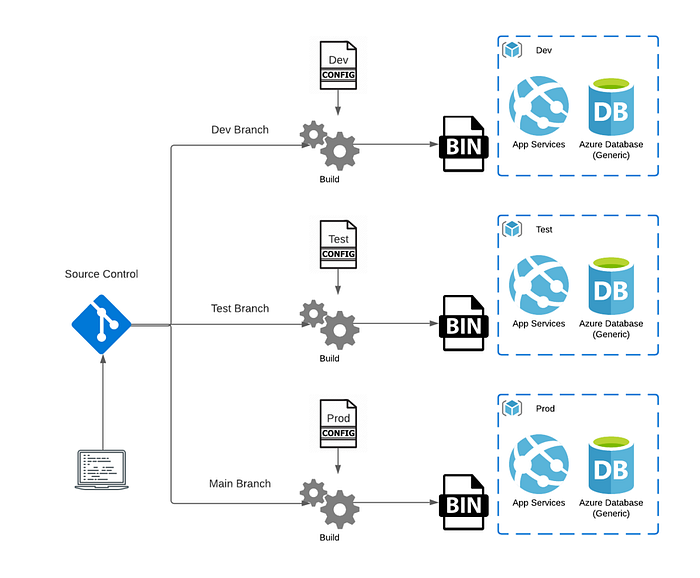
Under the compile-time approach, the binary tested in QA was technically unique compared to the binary shipped to production, increasing the likelihood of environment-specific bugs.
Modern Run-Time Pattern
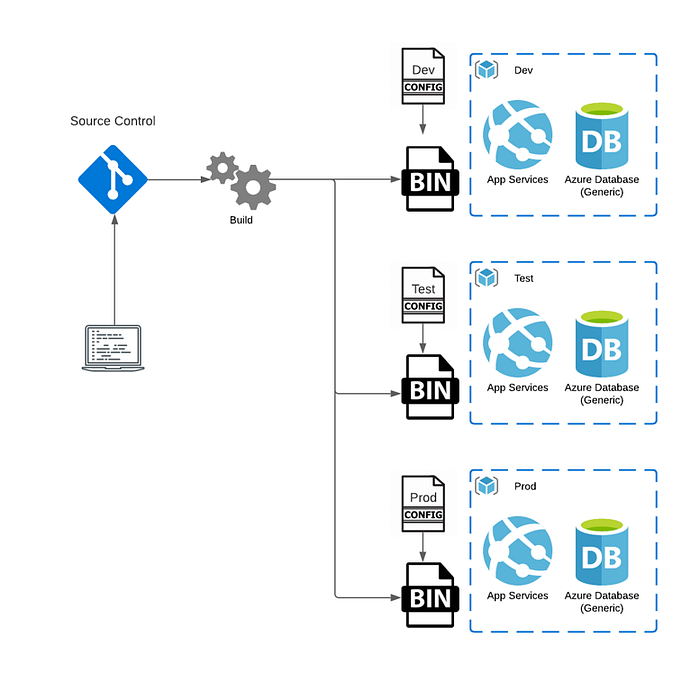
Modern .NET enforces a build once, deploy many pattern. The binary remains immutable across all environments. Environment-specific configurations are resolved at runtime, allowing the identical binary to run on a developer’s laptop, a staging server, and a production Kubernetes cluster without modification.
The Pain of the Past: Web.config and XML
In legacy .NET Framework applications, configuration relied heavily on the verbose web.config XML schema. Settings were limited to raw string-based key-value pairs and were typically accessed through the static ConfigurationManager class.
<appSettings>
  <add key="ClientValidationEnabled" value="true" />
  <add key="Greeting" value="Hello, Everyone!" />
</appSettings>
This model suffered from major architectural flaws:
- The static nature of
ConfigurationManagermade unit testing incredibly difficult, requiring mock wrappers to isolate tests. - XML transformations were fragile and complex.
- It lacked out-of-the-box dependency injection.
- Placing secrets directly in the file system made it highly prone to credential leakage.
The Modern Abstraction Pipeline
Modern .NET replaces static configuration with an extensible, provider-driven pipeline. The architecture decouples the raw configuration sources from how your application consumes them, relying on three foundational interfaces:
IConfigurationSource: Defines where the data lives (e.g., JSON, XML, INI, Environment Variables, or Key Vault).IConfigurationProvider: Pulls the raw data and flattens it into an in-memory dictionary of string key-value pairs.IConfigurationBuilder: Orchestrates these providers to build the finalIConfigurationcontainer.
Precedence and “Last Provider Wins”
When you instantiate a host, .NET registers default configuration providers in a specific order. Because providers are evaluated sequentially, any key collisions are resolved by the last provider loaded.
For example, if a setting is defined in both appsettings.json and as an environment variable, the environment variable overrides the JSON setting because it is registered later in the builder pipeline.
Hierarchical Keys and OS Delimiters
Nested JSON structures are flattened internally into colon-separated strings:
{
  "Database": {
    "Connection": "Host=localhost;"
  }
}
The configuration engine represents this as Database:Connection.
However, colons are invalid characters in environment variable names on many operating systems (such as Linux/Bash). To bridge this gap, the .NET environment variable provider automatically translates double underscores (__) into colons. In a production container, you can override this connection string by setting an environment variable named Database__Connection.
Strongly Typed Configuration & the Options Pattern
Directly querying IConfiguration using string indexers, such as config["Database:Connection"], is fragile and error-prone. The Options Pattern addresses this by allowing you to bind a configuration section directly to a strongly typed POCO class.
public class ConnectionSettings
{
    public string ConnectionString { get; set; }
    public int TimeoutSeconds { get; set; }
}

builder.Services.Configure<ConnectionSettings>(
    builder.Configuration.GetSection("Database"));
By registering this with your service collection, you decouple your business logic from the underlying configuration system.
Choosing the Right IOptions Lifetime
.NET provides three different interfaces for injecting these settings, each with distinct behaviors and lifetimes:
IOptions<T>: Registered as a Singleton. It reads the configuration once during startup and never updates. This is ideal for static settings, offering the highest performance with zero overhead.IOptionsSnapshot<T>: Registered with a Scoped lifetime, recomputed per HTTP request. If your configuration changes on disk, this interface ensures the next HTTP request receives the updated values.IOptionsMonitor<T>: Registered as a Singleton but actively listens for change notifications from the provider. TheCurrentValueproperty is always up to date. This is ideal for background services that need to adapt to configuration updates in real time without restarting.
Preventing Silent Failures: Fail-Fast Validation
A major issue with dynamic configuration is a missing key that only triggers an exception hours after deployment. Modern .NET enables Validation on Start to verify your settings as the host boots up, executing a fail-fast pattern.
You can apply standard data annotations directly to your Options models:
public class WebHookSettings
{
    [Required, Url]
    public string Endpoint { get; set; }

    [Range(1, 10)]
    public int MaxRetries { get; set; }
}
Then, configure the builder to validate on start:
builder.Services.AddOptions<WebHookSettings>()
    .Bind(builder.Configuration.GetSection("WebHook"))
    .ValidateDataAnnotations()
    .ValidateOnStart();
If the Endpoint is empty or invalid, the host throws an OptionsValidationException on startup, blocking the deployment pipeline immediately instead of letting a broken service silently go live.
Microservices: Centralized Configuration and the Sentinel Key Pattern
In microservices architectures, managing individual appsettings.json files across dozens of services becomes unmanageable. Azure App Configuration offers a centralized repository, but polling the cloud provider constantly for updates can result in rate-limiting issues.
To resolve this, use the Sentinel Key Pattern. Rather than observing all keys for updates, the application is configured to monitor a single “sentinel” key (e.g., Settings:Sentinel) at a set interval (such as every 5 minutes).
builder.Configuration.AddAzureAppConfiguration(options =>
{
    options.Connect(connectionString)
        .ConfigureRefresh(refresh =>
        {
            refresh.Register("Settings:Sentinel", refreshAll: true)
                .SetCacheExpiration(TimeSpan.FromMinutes(5));
        });
});
Whenever you modify any key-value pair in Azure App Configuration, you increment the sentinel value. When the application detects a change in the sentinel, it automatically reloads all registered configuration keys in a single transaction.
Cloud-Native Orchestration with .NET Aspire
With .NET Aspire, Microsoft leverages the existing configuration pipeline to manage service discovery in distributed systems. In a traditional setup, you must manually coordinate URLs and port bindings between microservices. Aspire abstracts this complexity.
In the Aspire orchestrator (AppHost), we register a backend API and pass it as a reference to a frontend project:
var apiService = builder.AddProject<Projects.ApiService>("apiservice");

builder.AddProject<Projects.WebFrontend>("webfrontend")
    .WithReference(apiService);
Behind the scenes, Aspire injects this reference into the webfrontend container using .NET’s double-underscore environment variable pattern:
services__apiservice__http__0=http://localhost:5461
In the frontend C# code, resolving the service location is entirely seamless:
builder.Services.AddHttpClient<WeatherClient>(client =>
{
    client.BaseAddress = new("http://apiservice");
});
The underlying service discovery provider intercepts "http://apiservice", parses the auto-injected environment variable services__apiservice..., and routes the traffic directly to the correct address.
Core Security Best Practices for .NET Configuration
- Do Not Commit Secrets: Never allow passwords, API keys, or certificates to enter your git history.
- Use User Secrets Locally: The local
secrets.jsonfile is stored outside your repository folder under your OS user profile, eliminating the risk of accidental commits. - Passwordless in Production: Combine Azure Key Vault with Managed Identities (
DefaultAzureCredential). This shifts authentication from passwords in connection strings to RBAC-based Azure AD authentication. - Avoid Logging Entire Configurations: Be cautious when logging configuration states. Directly serializing
IConfigurationcan easily leak keys and secrets straight into your application insights or syslog servers.